follow the money: how payments and cash out work on chilli
chilli takes a 0% platform fee. Every payment goes through Stripe, banking fees come out of the donation (never the tip), and the rest waits about a week as pending before it's ready to cash out. Here's what each status means and what happens with refunds and bank disputes.
This is the under-the-hood guide, for once your first donations land. Not set up yet? Start with set up donations and get funded by your community. Already there? Money is coming in, and your balance says pending, processed or on hold. Here's what happens to every euro, dollar or pound between your supporter's card and your bank account, and why.
the short version
0%platform fee: chilli takes no cut 2.9%+ €0.25 / $0.30 / £0.20 per payment for banking fees ~1 weekfrom payment to ready to cash out- 0% platform fee. chilli doesn't take a cut of your donations. The only thing deducted is banking fees: 2.9% plus a fixed fee per payment (€0.25, $0.30 or £0.20, depending on the currency). Banks and card networks charge them to move the money.
- the tip is never part of it. The optional tip supporters add at checkout goes 100% to chilli, and banking fees are calculated on the donation only.
- every payment is pending first, for about a week, while it clears. That protects you from having to pay anything back later.
- you decide when money moves. Nothing leaves your balance until you tap cash out.
- refunds are rare and handled by the chilli team, never taken from money already in your bank.
first, what's Stripe?

Stripe is the payment company behind millions of businesses online, from one-person shops to some of the biggest apps you use every day. When a supporter taps fund, Stripe takes the card, checks it and moves the money to your bank.
We partner with Stripe so your money sits in safe, regulated hands:
- security: card details go straight to Stripe, certified at the highest level of the card industry's security standard (PCI DSS level 1).
- the legal bits: anyone receiving money online has to be verified. Stripe runs that check once, when you set up donations, so there's no bank paperwork on your side.
- fraud screening: every payment is checked before it reaches you.
- paid anywhere: supporters pay in around 17 currencies, and you're paid in yours, in 40+ countries.
No Stripe login, no extra dashboard to learn: everything lives under revenue in your chilli dashboard.
who does what
- you: you have a Stripe account in your name, set up when you switched on donations. Stripe checks your identity once, and holds your bank details.
- your supporters: they pay by card on Stripe's secure checkout, in their own currency (around 17 to pick from), one-time or monthly, with an optional tip to chilli on top.
- Stripe: processes every payment, screens it for fraud and moves the money. chilli never sees your supporters' card numbers.
- chilli: runs the app, takes a 0% platform fee, covers currency conversion, cash out, bank disputes and refunds, handles bank questions, and keeps your balance up to date.
On bank statements, your supporters see chilli followed by your name, so they recognise the payment. When you cash out, the transfer shows up in your bank as chilliclub.
banking fees: what comes out of a donation
chilli takes a 0% platform fee. Here's every fee on a donation, and who pays it:
| fee | who pays | how much |
|---|---|---|
| platform fee | nobody | 0% |
| banking fees | deducted from each donation | 2.9% + a fixed fee per payment (€0.25, $0.30, £0.20...) |
| tip to chilli | the supporter, on top, if they want | their choice, 100% to chilli |
| currency conversion | chilli | nothing deducted |
| cash out (payout) | chilli | nothing deducted |
| bank disputes (chargebacks) | chilli | nothing deducted |
| refunds | chilli | nothing deducted |
| app store fees | nobody: every payment goes through Stripe's checkout, even from the app | none |
Banks and card networks charge banking fees to move the money. It's the same rate for everyone, one-time or monthly. Before this, chilli paid them on every donation. Small payments feel them the most, so now they come out of the donation they belong to.
Banking fees are calculated on the donation only, never the tip, in the currency your supporter pays in, and rounded to the cent. The fixed fee depends on that currency:
| fixed fee | currency |
|---|---|
| 0.20 | GBP |
| 0.25 | EUR |
| 0.30 | USD, PAB, CAD, AUD, CHF |
| 1.00 | AED |
| 1.25 | PLN |
| 1.50 | BRL, RON |
| 2.00 | DKK |
| 3.00 | NOK, SEK |
| 5.00 | MXN |
| 100 | HUF |
| 300 | ARS, CLP |
Here's a payment, start to finish. A supporter gives $10 and adds a $2 tip:
$10 donation + $2 tip
- you receive
- $9.41 (94%)
- banking fees
- $0.59
- tip to chilli
- $2.00, paid on top
The tip is paid by the supporter on top, never taken from you, and never part of the banking fees calculation. Supporters and your public pages always show what was given ($10), not what's left after banking fees.
This applies to every payment since October 21, 2026, including the renewals of your existing monthly supporters. Payments made before then stay exactly as they were.
small payments, big payments
The fixed part is the same on every payment, so it weighs more on a small one. The share you keep grows with the amount:
$3 donation
- you receive
- $2.61 (87%)
- banking fees
- $0.39
$5 donation
- you receive
- $4.55 (91%)
- banking fees
- $0.45
$10 donation
- you receive
- $9.41 (94%)
- banking fees
- $0.59
$25 donation
- you receive
- $23.97 (96%)
- banking fees
- $1.03
Monthly support at a comfortable amount keeps more of every payment, month after month. How to ask for it: grow your monthly supporters (without guilt-tripping anyone).
where you see it
- revenue: your earnings are shown after banking fees, and each month's total reads "supporters gave [amount] · banking fees [amount]".
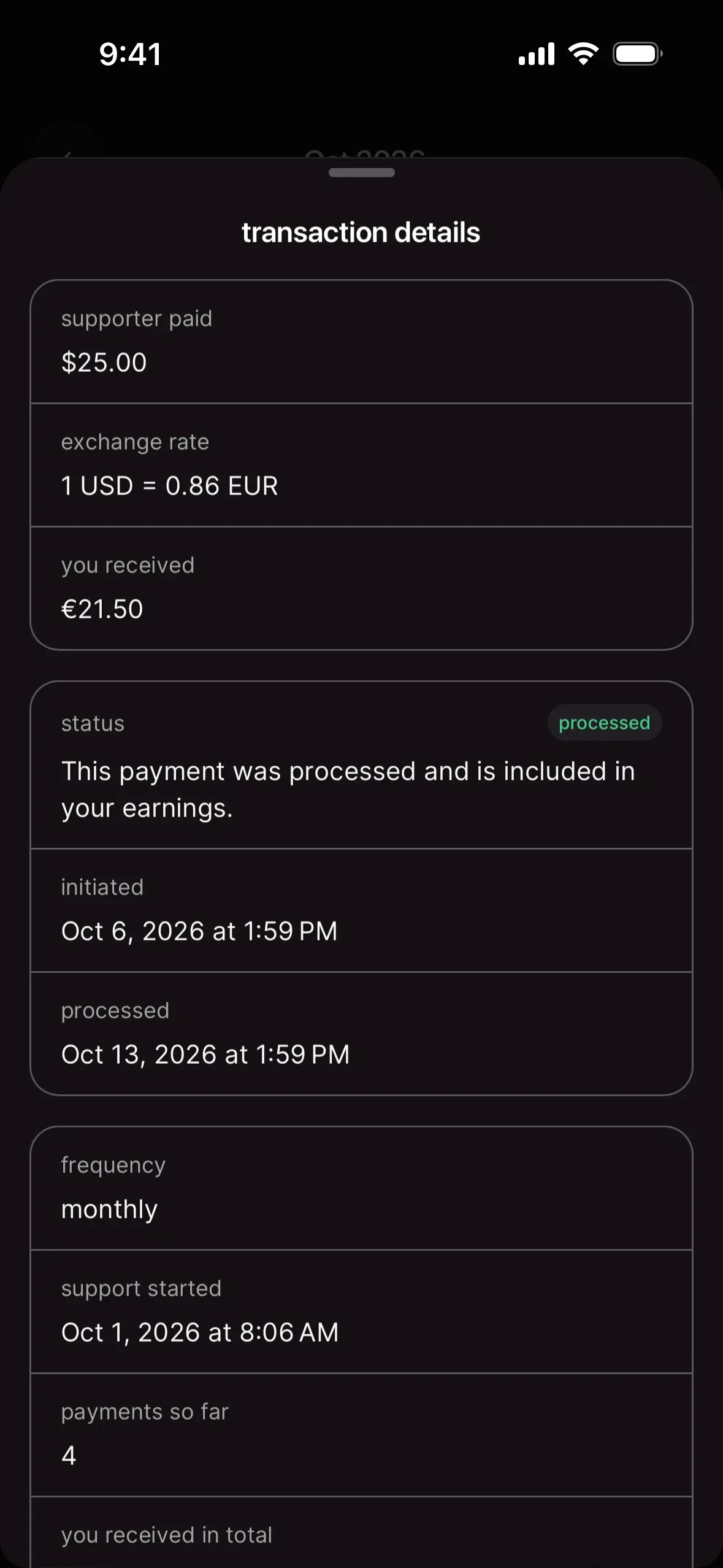
- payment details: tap any payment in your balance to see it laid out, line by line:
- supporter gave: the donation, in their currency
- tip to chilli: paid by the supporter, not from you
- exchange rate: the rate used to pay you in your currency
- banking fees: the amount deducted, in your currency (for example −$0.59)
- you receive: what lands in your balance
- download transactions: the CSV has amount sent, banking fees and amount received for every payment.
the life of a payment
- a supporter pays. You get a "cha-ching, you've been tipped!" notification, and the payment shows in your balance as pending.
- it clears. For about a week, the payment sits in pending earnings. Stripe settles the money, and the window lets a bank flag anything unusual before it reaches you.
- it's processed. The payment moves to available to cash out.
- you cash out. Whenever you're ready, you send your whole available balance to your bank.
- it lands. The cash out shows processing, then received, usually a few business days later.
why about a week?
Card payments aren't final the second they go through. In the first days, a supporter's bank can still reverse a payment: a stolen card, a duplicate charge, someone who doesn't recognise the line on their statement. Holding new payments for about a week means those surprises get caught while the money is still in your balance, not after it's in your bank. Sometimes it takes a little longer, depending on your country and on how fast Stripe settles a payment.
every status, explained
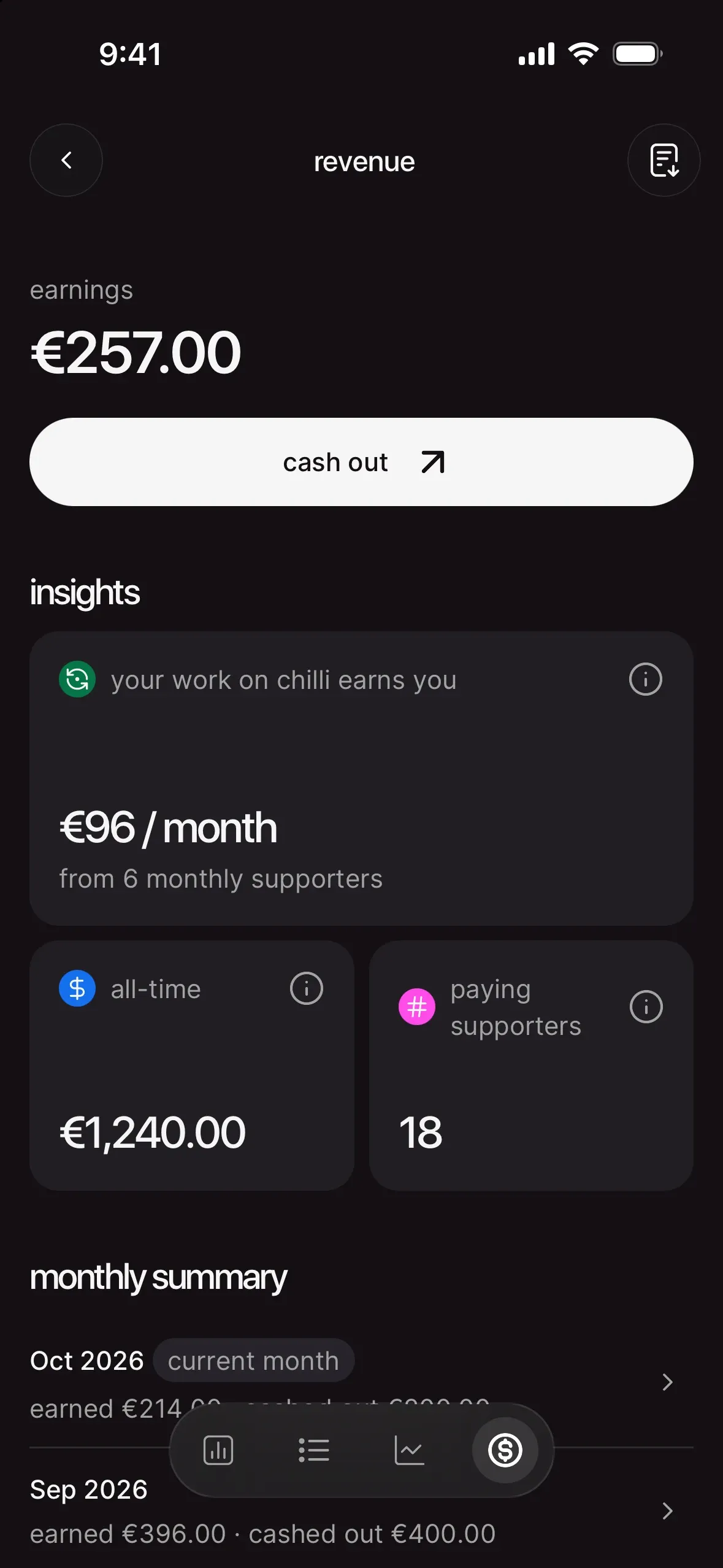
Open revenue in your dashboard, then tap a month in monthly summary to see every payment and cash out with its status.
payments
| status | what it means | anything to do? |
|---|---|---|
| pending | the payment went through and is clearing. Counts in pending earnings. | no, give it about a week |
| processed | cleared. It's part of available to cash out. | cash out whenever you like |
| on hold | the supporter's bank is reviewing the payment. It stays in your balance but can't be cashed out yet. | no, we handle it with the bank and keep you posted |
| refund processing | the payment is being returned to the supporter. Not counted in your earnings. | no |
| refunded | the payment went back to the supporter. Not counted in your earnings. The reason is in the payment details. | no |
| failed | the payment didn't go through (a declined card, for example). Nothing reached your balance. | no |
cash outs
| status | what it means |
|---|---|
| processing | on its way to your bank account |
| received | it reached your bank account |
| failed | it couldn't be completed. The money stays in your balance. |
| canceled | it was stopped. The money stays in your balance. |
Your download transactions CSV uses the same logic, with one status per payment: pending, success, cashed-out, refund-pending, refunded or failed.
when a payment goes sideways
Most payments go from pending to processed without a hitch. For the few that don't, here's what happens.
failed payments
A card gets declined, a bank says no. The payment shows as failed, nothing lands in your balance and nothing comes out of it. For a monthly supporter, it only affects that month's payment, and they can fix it themselves: their membership shows the overdue payment, with finish my payment and update payment method. Once they pay, it goes through like any other payment.
refunds
Only the chilli team can refund a payment, and only while it's still in your balance (not once it's been cashed out). A refund is always for the full amount, tip included. In the payment details, the refund reason tells you why:
- requested by the supporter: they asked us, and we agreed.
- duplicate payment: the same support went through twice.
- reported by the supporter's bank: the bank flagged the payment as fraudulent.
If a supporter asks you for their money back, send them to the chilli team. You can't refund from your side, and a promise you can't keep costs more trust than the donation.
bank reviews and disputes
Sometimes a supporter's bank looks at a payment again after it went through. Often it's just someone who doesn't recognise the line on their statement. While the bank reviews it, the payment is on hold: you get a notification, the amount stays in your balance as on hold, and you can still cash out the rest.
Then one of two things happens:
- the bank confirms the payment: the hold lifts and the money joins available to cash out.
- the bank sides with the supporter: the payment goes back to them and leaves your balance. It shows as refunded, with "returned to the supporter after a bank dispute" as the reason.
Bank reviews can take a few weeks. There's nothing for you to send or sign. We deal with the bank and Stripe, and every payment is screened by Stripe's fraud checks before it ever reaches you.
once it's in your bank, it's yours
cashing out, in detail
- a small minimum: cash out opens once your available balance passes a small amount in your currency. Below it, the app shows "you're getting close" and the amount to reach.
- all at once: a cash out sends your whole available to cash out balance. Pending and on-hold money stays behind until it's ready.
- one at a time: while a cash out is processing, the next one waits.
- your currency: supporters pay in theirs, you're paid in yours, at the current exchange rate. Each payment's details show the rate used.
- arrival: "most transfers arrive in a few business days". It shows on your statement as chilliclub.
- only when you say so: chilli never sends money to your bank on its own schedule. You tap cash out, check the bank shown ("to [your bank] •••• [last 4 digits]"), then confirm cash out.
If a cash out fails (a closed account, a typo in the bank details), the money goes straight back to your balance. Check your bank details with complete setup on your profile, then try again. Still stuck? The chilli team can look at it with you.
monthly supporters, under the hood
- every month is its own payment. Each renewal goes through the same path: pending, processed, available.
- monthly support is the whole package. While someone backs you monthly, that's their way of supporting you: they can't start another donation to you, monthly or one-time, until their monthly support ends.
- canceling stops what's next, not what's done. When a supporter cancels, future payments stop. Everything they've already given stays yours.
- your recurring income ("your work on chilli earns you [amount] / month") is based on the latest successful payment from each active monthly supporter. It moves when support starts or ends, and when exchange rates change.
your records (and taxes)
- monthly summary: what you earned and cashed out each month. Tap a month for every payment and cash out.
- download transactions: a CSV of your full history: supporter, amount sent, banking fees, amount received, currency, one-time or monthly, dates (created, processed, cashed out), status and a link to the receipt.
- receipts: every payment has a view receipt link in its details.
chilli doesn't file or collect taxes for you. Depending on where you live, donations can count as income, so it's worth checking with an accountant. The CSV is made for exactly that conversation.
good to know
can I refund a supporter myself?
No. Refunds go through the chilli team, so they're tracked, fair and never taken from money already in your bank. Point the supporter to us.
I'm moving to another country. what happens?
Talk to the chilli team before you change anything. Your Stripe account, your currency and your bank account are tied to your country, and we'll help you move your balance across cleanly.
can I delete my account with money in my balance?
Not yet. Cash out what's available first. Account deletion waits until every payment has cleared, nothing is being refunded and your balance is cashed out, so no money gets lost on the way.
my country isn't supported
Donations work for creators in 40+ countries for now. If yours isn't on the list when you set up donations, the app tells you, and the chilli team can help you figure out next steps.
your next move
Open revenue in your dashboard and tap cash out: compare available to cash out with pending earnings, and you'll see exactly where your money is. Then download your transactions once a month, so your records are never a scramble. And to grow what flows in, head to grow your monthly supporters (without guilt-tripping anyone).

 real win · Caroline GleichHow Caroline Gleich made Stratos a national fight