how to create your first action on chilli, step by step
Tap + (or create on a computer), tell the story (image, title, intro, why it matters), add at least one way to help, and publish. Fifteen minutes, tops, and your supporters get notified.
Your first action is the moment chilli stops being "that app I signed up for" and starts being the place your followers go to do something. Good news: it takes about 15 minutes, and the app autosaves as you go, so you can't really break it.
Here's the exact flow, screen by screen.
before you start: have these three things ready
- the fight, in one sentence. "Stop CBP bulldozing Big Bend National Park."
- the target: the named person or organisation with the power to change it. An email address, phone number or post link. Not sure who? Read pressure points: how to pick the right target for your campaign first.
- an image that makes people feel something. Your own photo, or search Unsplash from inside the app. What size and how to frame it: action images: how to pick and frame a photo people stop for.
step by step
- Tap + to start. On mobile, it's the + button in the bottom bar. On a computer, click create in the left sidebar. A draft opens right away, and drafts autosave.
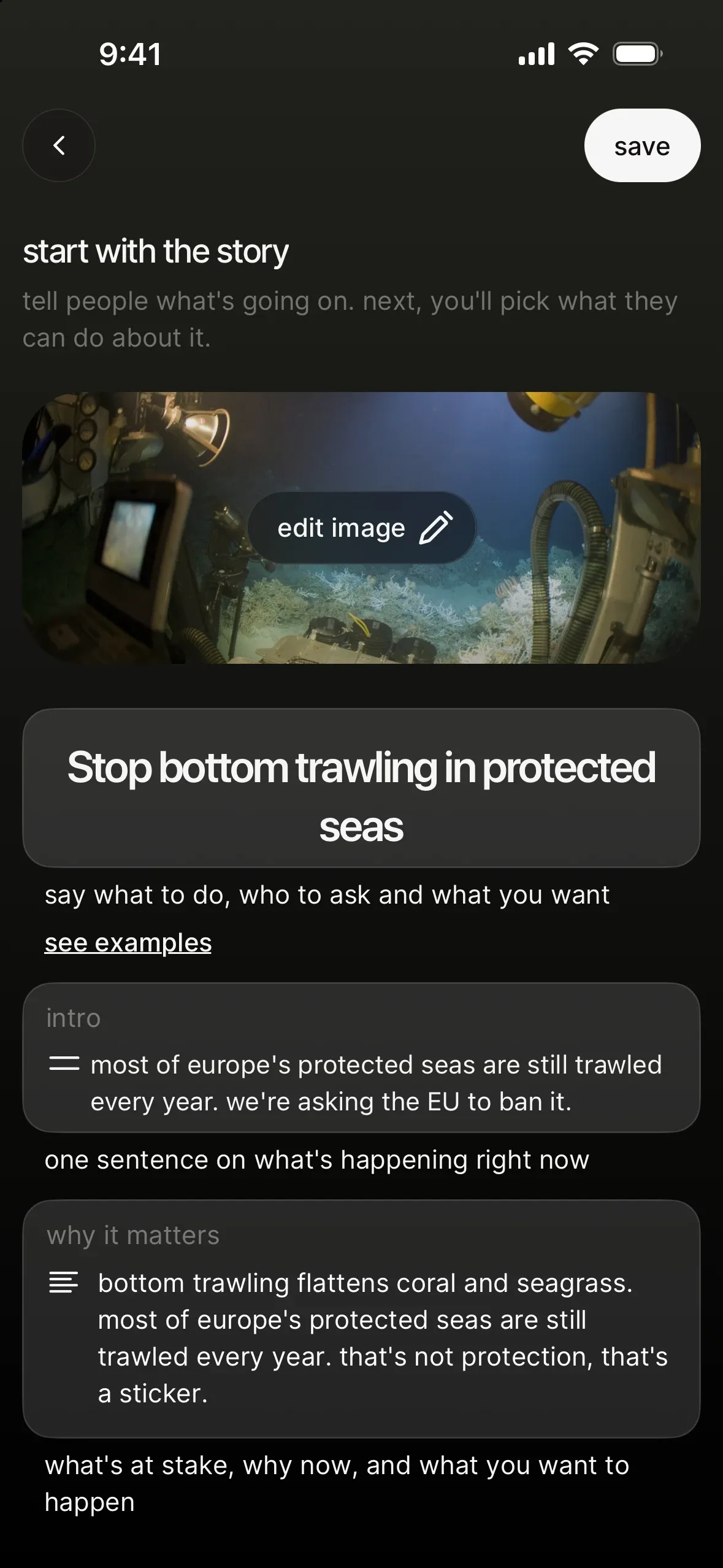
- "start with the story": add the image. Tap add an image, then pick from Unsplash or "upload an image" (5MB max). The app's advice is spot on: "pick a photo that makes people feel something: a face, a place, an animal. skip logos and charts." Then frame your image: drag to move, zoom, keep faces inside the safe zone and tap use this image. More in action images: how to pick and frame a photo people stop for.
- Write the title. This is your headline and your call to action. Say what to do, who to ask and what you want. Stuck? Tap see examples under the title: "write a title people act on" walks you through the four ingredients (what to do, who can fix it, what you want, why now) and asks you to hit at least three. The app allows up to 150 characters, but under 70 is easier to read, and it'll tell you so. More in the CTA formula: how to write an action title people can't ignore.
- Add an intro. One sentence on what's happening right now (125 characters max). It shows up when people first open the action.
- Write "why it matters". Your story: what's at stake, why now, what you want to happen. Tap it and choose write it myself or write it for me: answer 3 quick questions (what's happening and who's affected, why it matters now, what you want to happen), pick a vibe ("as me", "nerd", "funny", "urgent" or "inspiring") and chilli writes a first draft in your voice. Edit it until it sounds like you.
- Add your ways to help. In the "ways to help" section, tap add a way to help. You'll see "what should your supporters do?", with a one-liner for each type: email, social comment, Google Maps, phone call, survey or external link. Then fill in the setup (for an email: to, subject, body). Got drafts already? Tap my drafts (N) in the picker to jump straight to them.
- Choose "when should people see this?" for each way to help: publish now, schedule (today, tomorrow, in 2 days, next week or a custom date and time) or save as draft. Scheduling is great for drip-feeding your action over a week. Only you see scheduled and draft ones until they go live. More in ways to help, explained: every type of action on chilli.
- Repeat step 6 until you have three or more. As the app puts it: "start with one, aim for 3". One easy one (a comment), one that hits harder (an email to the target), one that shows up differently (a call or a review).
- Tap "publish". You'll get a "ready to go live?" check: "anyone with the link can see your action and take part. we'll also let your supporters know." Tap go live when you're sure, or not yet to keep polishing.
- "your action is live!" Tap share the link for share images and a link, or see my action to see it as your followers will.
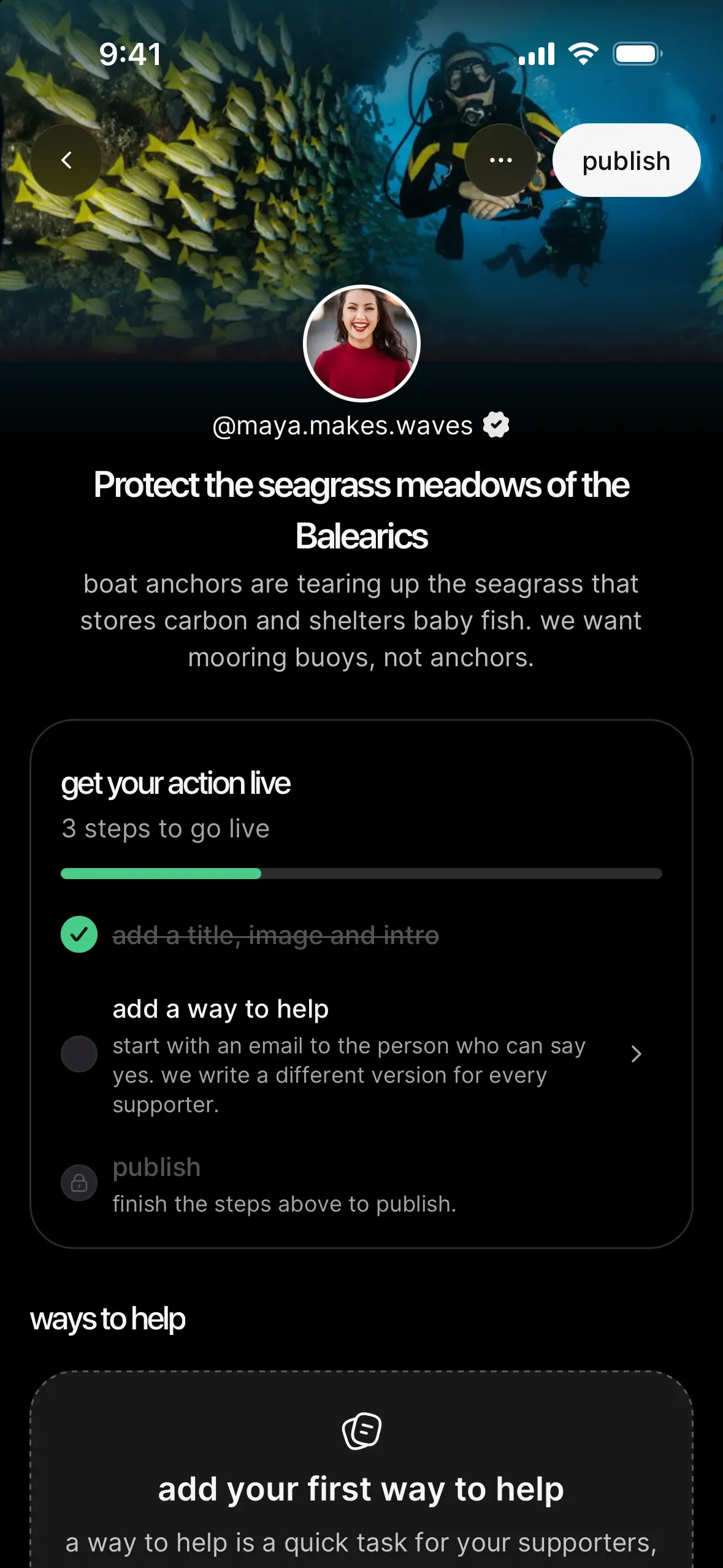
your go-live checklist
On your first actions, your action page shows you what's left to do. While it's a draft, the top says get your action live, "3 steps to go live":
- add a title, image and intro.
- add a way to help. If you only have drafts, it reads publish a way to help and tells you how many are waiting.
- publish. It stays locked until the first two are ticked. Only the person who created the action can publish it.
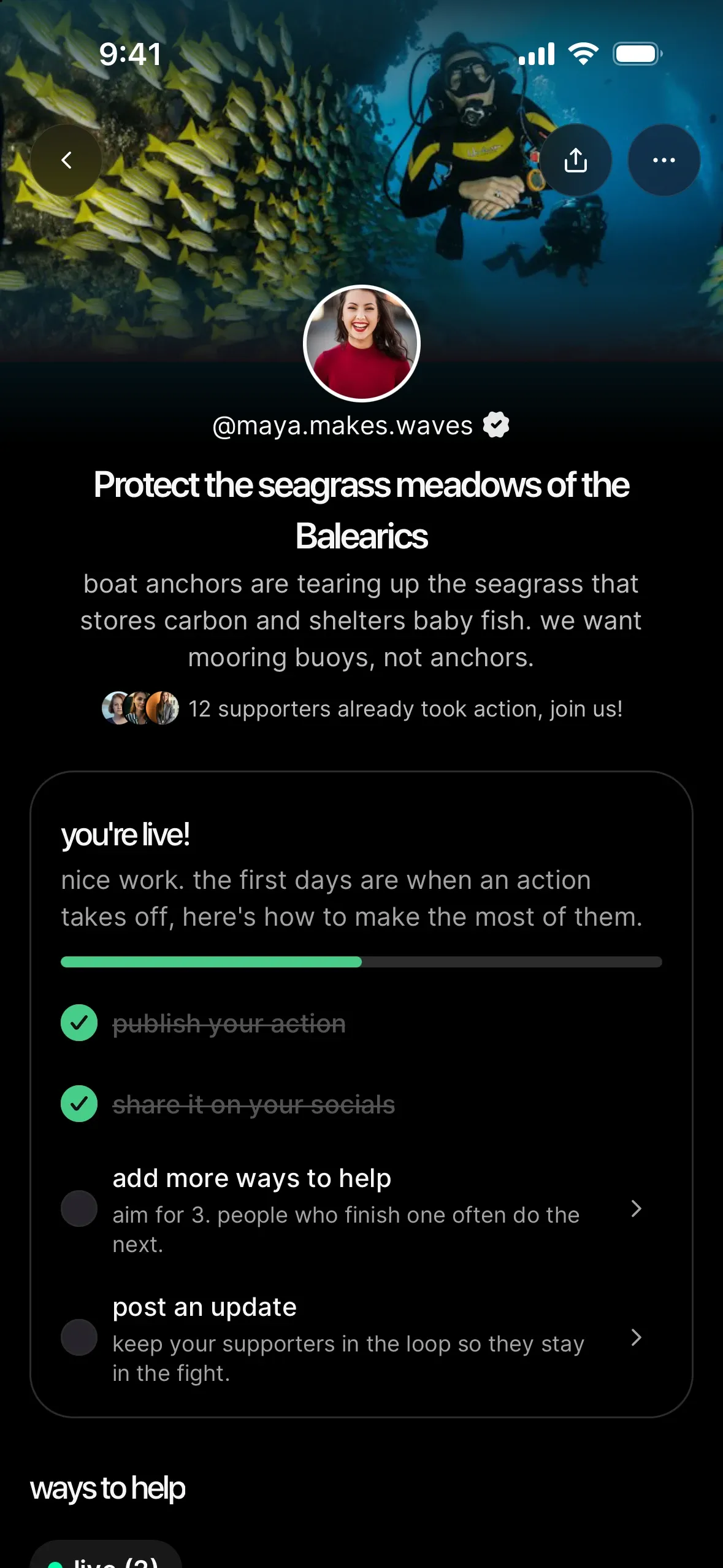
Once you go live, it turns into you're live! for 15 days, because the first days are when an action takes off:
- share it on your socials. It ticks when you share from the app on this phone or computer, or once 5 supporters have joined.
- add more ways to help. "aim for 3": people who finish one often do the next.
- post an update to keep your supporters in the fight. See close the loop: show your supporters their action mattered.
Tick all three and it goes away. Once you have 10 live actions, you won't see it at all: you know the drill by then.
setting up an email (the one you'll use most)
Email is the backbone of most winning actions, so here's how to make it land:
- to: the real address of the person who decides. The app flags addresses that may not exist, so you'll know if one bounces.
- subject: short and specific. "Pause construction in Big Bend National Park" beats "Concerned citizen".
- body: write it as one supporter would. Polite, firm, one ask. chilli rewrites it for each supporter, so a thousand emails don't arrive as a thousand identical copies (which inboxes love to filter).
Dear [name],
I'm writing from [city] because [the thing] is happening right now, and you have the power to stop it.
[One sentence of hard fact: a number, a date, a consequence.]
I'm asking you to [one specific ask] before [deadline].
Thank you, [supporter name]
For all six types, with tips for each: ways to help, explained: every type of action on chilli.
after you publish
Your action is live at app.chilli.club/a/…. A few creator tools worth knowing, all on your action page:
- pin a way to help so it sits at the top.
- reorder ways to help by dragging them.
- move to draft, archive or delete a way to help once it's done its job.
- from your action's menu: edit, export supporters (CSV), move to drafts or delete. Moving to drafts hides the action, but your supporters and stats stay, and you can publish it again anytime.
- post updates to "the fight so far" to tell supporters what happened. This is how you get them back next time.
Your first action also unlocks your dashboard: a dashboard tab on mobile, and dashboard in the left sidebar on a computer. Your latest actions show up under actions on the dashboard home, and the actions page lists all of them, drafts included: search them, filter published or drafts, sort by newest or last edited, and start the next one with new action.
Sometimes the chilli team prepares ways to help, updates or even a whole action for you. They wait under ready to publish on your dashboard, and you decide what goes out: review what the chilli team prepared for you.
Then go share it. The action is the easy part; getting it in front of people is where fights are won. Start with share your action: captions, stories and reels that get people moving.
what good looks like
EarthlyEducation's Big Bend action was simple: emails to House appropriators and committee leaders, plus a phone call to Congress. Clear target, clear ask, live moment. 2K emails and 65 calls later, CBP paused construction inside the park, six days after launch.

 real win · Earthly EducationHow Big Bend's bulldozers got stopped
your next move
You've got the mechanics. Now make a plan so your first action isn't your last: your first 30 days on chilli: a week-by-week plan.